Building a Production GA4 BigQuery Pipeline with Dataform
GA4's BigQuery export is one of the most powerful features Google offers, but the raw data is nearly unusable out of the box. A production transformation layer turns it into clean, queryable sessions, page views, users, and conversions. That gap between exported data and usable data is where most teams get stuck, and it is what a well-structured BigQuery pipeline solves.
The Challenge of Using Raw GA4 Data in BigQuery
Enabling GA4's BigQuery export is a simple step that gives teams access to one of GA4’s most valuable capabilities, event-level data that most analytics tools never expose. Clicks, scrolls, page views, and conversions are available in full fidelity inside your own warehouse.
The challenge becomes clear as soon as teams start working with that raw data. The raw GA4 export is structured for Google's internal event ingestion pipeline and is not meant for human analysts. Events arrive as individual rows, each carrying a deeply nested array of parameters.
Sessions don't exist as a readymade concept. They have to be constructed. Page views are events like any other, buried alongside scroll events and video interactions with no built-in hierarchy. Conversions are flags inside event records. User properties live in repeated fields that require unnesting before you can touch them.
If you've ever tried to write a query against raw GA4 data, you know the experience. A question that should be a five-line SQL query turns into fifty lines of unnesting, filtering, and aggregation, and that's before analysis even begins.
What An Analytics-ready GA4 Dataset Looks Like
Before diving into how the pipeline works, it helps to define the target state, which is a clean, flat ga4_reporting dataset in BigQuery containing four core tables:
- fct_sessions: one row per session, with traffic source, device, geography, engagement metrics, and conversion flags
- fct_page_views: one row per page view, with session context, scroll depth, and time-on-page
- dim_users: one row per user, with first/last seen dates, acquisition channel, and behavioral summary
- fct_conversions: one row per conversion event, joined back to the session and user that produced it
Supporting dimension tables, including pages, traffic sources, and devices, sit with these core tables and enable clean joins without repeated logic across queries.
If you are comfortable with SQL, you can confidently query these tables directly. Any BI tool, such as Data Studio, Tableau, or Power BI, can connect to them without transformation. Downstream models can be built on top of them in a separate pipeline without touching the framework itself.
The Three-Layer Pipeline Architecture
The pipeline follows a three-layer transformation model that is common in modern data engineering, with specific features added for GA4 quirks.
Staging
Staging takes the raw GA4 export tables and flattens them by unnesting event parameters into columns and resolving repeated fields. The output is still one row per event, but it's clean, typed, and queryable without repeated unnesting logic. Stream-type handling also happens here, whether the property includes web data, an app, or both. That logic normalizes column naming and coalescing logic downstream.
Intermediate
The intermediate layer handles the analytical work. This layer constructs sessions from sequences of events, assembles page views with their associated metrics, identifies conversions based on configurable rules, and builds user-level aggregates. Getting this layer right is the hardest part. Sessionization logic, in particular, has many edge cases around session timeouts, cross-device behavior, and direct traffic attribution.
Reporting
Reporting materializes the final ga4_reporting tables that analysts and BI tools actually query. These are optimized for read performance, partitioned by date, and clustered on the dimensions most commonly used in filters.
Key Design Decisions
Several decisions in this architecture are worth highlighting because they solve problems that often surface only after teams begin working with real GA4 data.
Why Dataform Fits This Pipeline
Dataform is the orchestration layer that manages these transformations. It runs natively inside Google Cloud, so the pipeline lives entirely within your GCP project without external infrastructure. Models are written in SQLX, a thin extension of standard SQL that adds dependency declarations, allowing Dataform to build and execute the DAG (directed acyclic graph) in the correct order automatically.
The key architectural decision is that Dataform treats your pipeline as a codebase. Each model is a file, its dependencies are explicit, and the full pipeline can be version-controlled, reviewed, and deployed like software. This matters a lot once you're running this across multiple clients or need to ship a change without breaking production.
Incremental Loading Vs. Full Refresh
Most tables in the pipeline load incrementally, only processing new event data each run. This keeps execution costs low and runs fast. Full backfill capability is built in as a flag that can be set at execution time, so a historical reload is always available without the risk of accidentally triggering it on a scheduled run.
Null-safe Key Construction
Composite keys in GA4 data, such as user/session identifiers assembled from multiple fields, require explicit null guards before hashing. Hashing a null field produces a valid-looking hash that silently collapses unrelated records into one. The pipeline uses TO_BASE64(MD5(CONCAT(field1, '|', field2))) with null checks on every component before the hash is computed.
Dynamic Column Naming For Multi-stream Properties
GA4 properties that collect both web and app data use different field names for equivalent concepts across streams. The pipeline detects the effective stream type at the property level and names columns accordingly using page_* for web-only, screen_* for app-only, content_* for coalesced web and app data. This keeps downstream queries from having to account for stream type.
What The Output Enables
Once ga4_reporting is running, the output is a standard BigQuery dataset that works with anything in the Google Cloud ecosystem and most tools outside it.
- BI and reporting are the most immediate use cases. Data Studio, Tableau, and Power BI all connect directly to BigQuery. Because the reporting tables are flat and well-named, analysts can build using familiar concepts like sessions, page views, and conversions without additional transformation or repeated event arrays.
- Custom downstream models can be built in a separate Dataform repository that treats ga4_reporting as a data source. This is the recommended path for client-specific logic, including custom attribution models, site-specific content groupings, and business-rule-based segmentation that should not live in the core pipeline. The separation keeps the framework clean and makes client customizations easy to maintain independently.
- Conversational analytics becomes possible once the data is structured. We've layered a BigQuery-native conversational analytics agent on top of this pipeline that allows business users to ask questions in natural language and get back SQL-generated answers, charts, and follow-up suggestions. That agent depends on the foundation this pipeline creates.
The Tool Stack
The pipeline runs on three tools:
BigQuery
It's the warehouse. Since GA4's export already lands here, there's no ingestion layer. The pipeline starts from the data already in your GCP project.
Dataform
This handles transformation orchestration. It's SQL-native, runs inside GCP without additional infrastructure, manages model dependencies automatically, and supports version-controlled deployments. For a pipeline of this complexity, the DAG management alone helps justify the choice because manually ordering and scheduling interdependent SQL queries does not scale.
Git
It provides version control and the deployment model. Every change to the pipeline goes through a repository, which enables code review, rollback, and the upstream/fork pattern described in the next section.
Git Hosting Considerations
We use Bitbucket because it is Bounteous's enterprise standard and aligns with our existing CI/CD process. For teams choosing a Git host specifically for Dataform, GitHub is the stronger choice as it was Dataform's first integration target and currently supports write operations from the Dataform UI that Bitbucket does not.
Bitbucket works well for the pull-based workflow this pipeline uses, where changes are pushed via terminal or IDE, and Dataform pulls and executes them. But committing changes directly from the Dataform workspace is only supported with GitHub. Dataform also supports a native hosted repository option for teams that prefer to skip external Git hosting entirely, at the cost of some version control flexibility.
Scaling The Pipeline Across Clients
A pipeline that works for one GA4 property is a script. A pipeline that works across dozens of clients with different properties, stream types, conversion events, and reporting requirements is a framework. The difference comes down to how much behavior is hardcoded versus configurable.
Config-driven Architecture
The pipeline uses a small set of configuration objects to control behavior that varies by client. Property definitions, stream type, and conversion event rules all live in config files. A sample of what that looks like:
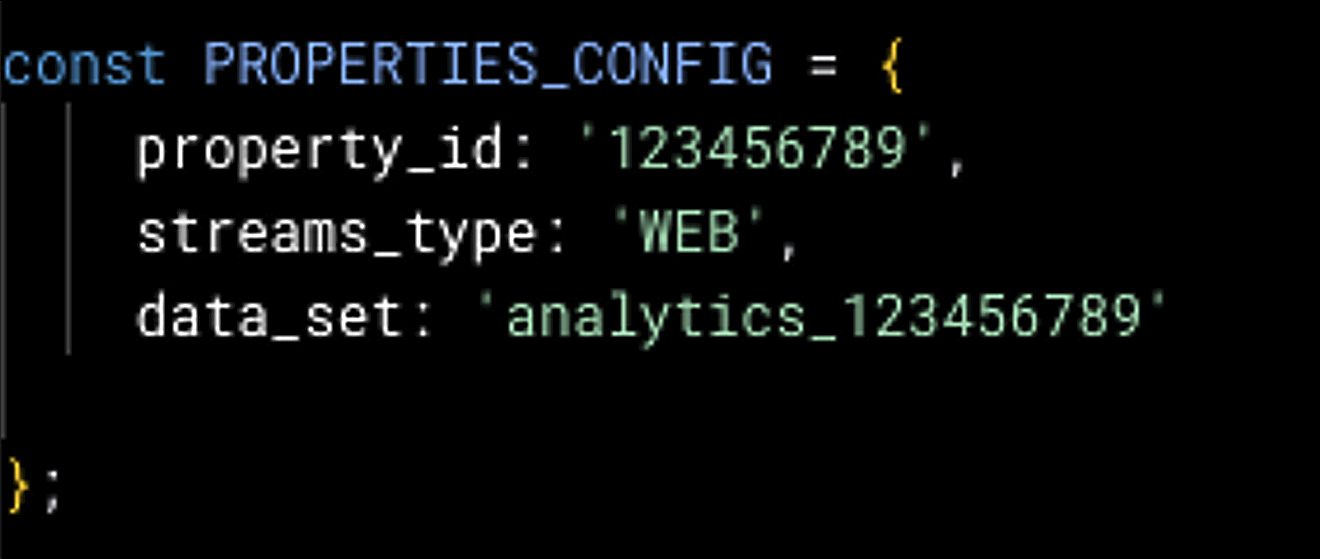
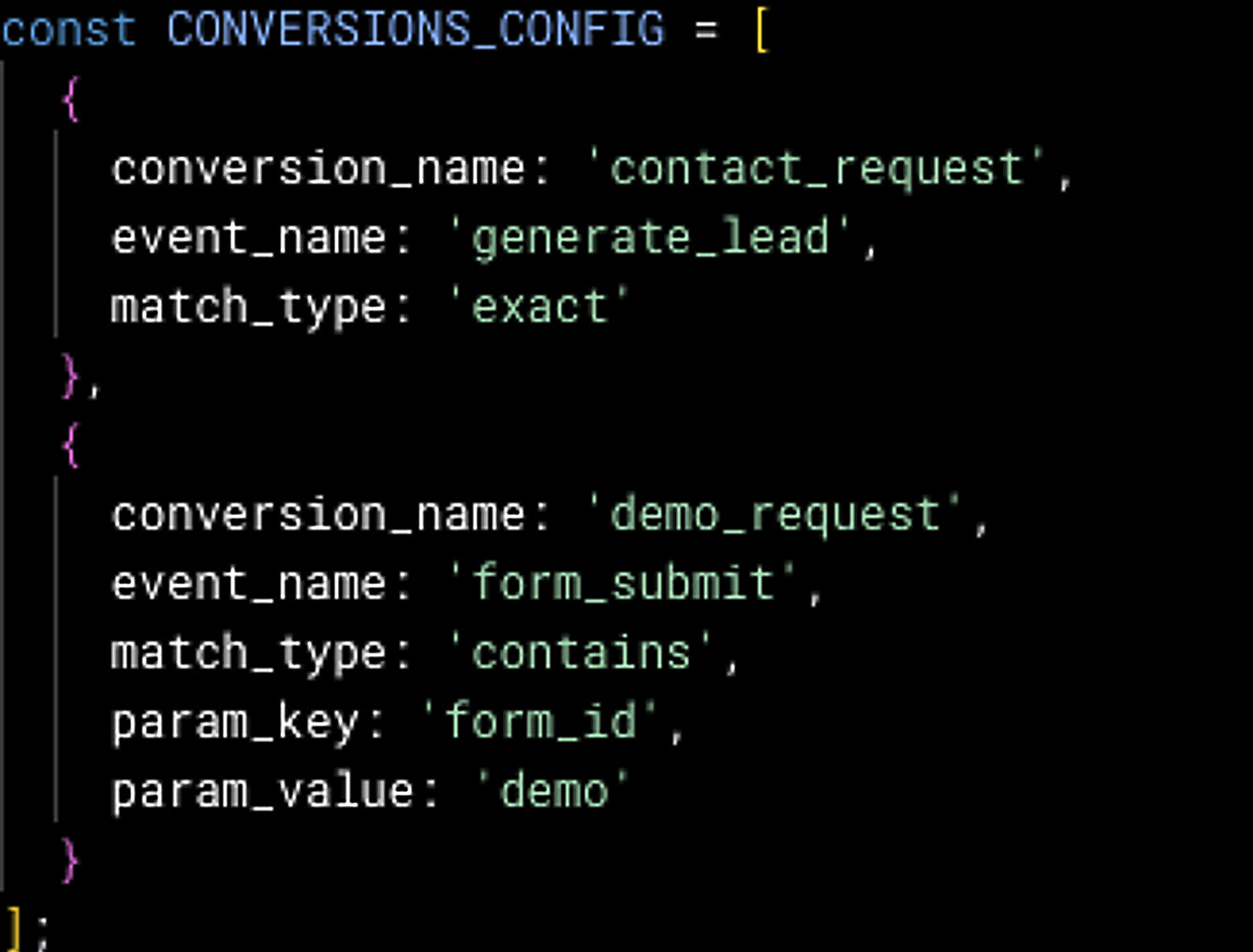
Changing which GA4 property the pipeline processes, or adding a new conversion event, requires editing a config file, not the SQL itself. This distinction matters because config changes are low-risk and easy to review. SQL changes require understanding the full transformation logic.
The Upstream/Fork Deployment Model
The framework lives in a Bounteous-maintained repository. Each client deployment is a fork of that repository, containing only their configuration files and any client-specific extensions. When Bounteous ships a framework update, a bug fix, a new feature, or an improvement to sessionization logic, clients can pull that update into their fork while their configuration remains untouched.
This is the same pattern used by large open-source projects that support many downstream consumers, and it solves a similar problem of maintaining a shared codebase when every consumer has customizations.
Build, Use A Framework, Or Bring In A Partner
Not all GA4 analytics need this level of infrastructure. The right path depends on complexity, scale, and how quickly the pipeline needs to be production ready.
Build It Yourself
If your needs are straightforward with a handful of tables, a single GA4 property, no multi-stream complexity, and you have someone on your team comfortable with Dataform and SQL. A simple pipeline with three or four tables, no dynamic components, is a medium-sized project for an experienced data engineer. Even though it takes a little time, the concepts here are enough to get teams started.
Use An Existing Framework
When complexity starts increasing across multiple GA4 properties, mixed web and app streams, configurable conversion logic, incremental loading with backfill capability, and deployment across environments. Each of these problems is solvable in isolation. When you need all of them together, the engineering effort compounds quickly, and the edge cases are non-obvious until you're already in production with real data.
Bring In A Partner
When time is the binding constraint, or when complexity is high, and internal bandwidth is low. The framework described in this post took significant engineering time to get right. The challenge is getting sessionization, key construction, multi-stream handling, and config-driven architecture to work reliably together. That work requires iteration, and the edge cases tend to compound once the pipeline is running against production data.
Looking at the pipeline in terms of complexity, scale, and how quickly you need it can help answer the build-versus-buy question. Building it on your own can help you understand your own company’s data better and can be a rewarding experience in itself. Starting from a framework can shorten the path when the requirement is broader, more urgent, or harder to maintain long-term.
GA4’s raw export is an asset most organizations are sitting on without being able to fully use. The pipeline turns it into something analysts can query, BI tools can connect to, and businesses can use for decision-making. Whether teams build it themselves or start from a framework, the transformation layer is what makes GA4’s BigQuery export usable at scale.
News & Insights
Featured Perspectives